
Fresh Calendars Shop earns a commission when you buy through retailer links on this page, at no extra cost to you.
Nine of these ten digital calendar listings state that sync works with no subscription, and the SkyPeace 15.6-inch is the lowest priced of them; the Dragon Touch keeps its core free but charges for its Magic Import tool. Every claim here is read straight from the maker listing, with the exact fee wording quoted and nothing assumed. The screens range from 15.6 up to 32 inches, so a no-fee calendar is within reach at nearly any size.
How we read the subscription claims
We pulled the fee line from each maker listing on our digital wall calendar pages on Nov. 21, 2026 and quote it word for word, rather than deciding for a maker. Where a listing says nothing about fees, we mark it so, because a silent listing is not a promise. The ten screens are sorted by price, and our rating method sits at how we rate products. Out-of-stock models and duplicate color listings were left out.
| If you want | Pick | Why, from the listing |
|---|---|---|
| The lowest price with no stated fee | SkyPeace 15.6 | Lowest price here; listing says no subscription fees |
| The biggest no-fee screen | Cozyla Calendar Plus 2, 32 in | 32-inch 4K; listing says sync without subscription |
| The most storage | Yemsd 15.6 | 32GB expandable; listing says no subscription fees |
| Built-in voice, no fee | Apolosign 15.6 | Google Gemini; listing says no subscription required |
| To know the paid-tier one | Dragon Touch 21.5 | Core free; Magic Import is a paid tool |
| The most members on one screen | AOC 15.6 | Up to 20 color-coded members; listing says zero fees |
| Screen | Size | Subscription, per listing | Sync and accounts | Price | Price per inch |
|---|---|---|---|---|---|
| SkyPeace | 15.6 in | No subscription fees | Google, Apple, Outlook, Yahoo, Cozi, TeamSnap; two-way | $159.99 | $10.26 |
| Aimuonos | 15.6 in | Core features free, no fees | iCloud, Google, Outlook | $162.99 | $10.45 |
| Airzeen | 15.6 in | No monthly fees | Google, iCloud, Outlook, Cozi, Yahoo | $186.99 | $11.99 |
| Yemsd | 15.6 in | No subscription fees | Google, Outlook, iCloud; real-time | $218.39 | $14.00 |
| Dragon Touch | 21.5 in | Core free; Magic Import paid | Google, Outlook, iCloud | $229.49 | $10.67 |
| Topelotek | 21.5 in | No subscription | Two-way real-time to phones | $229.99 | $10.70 |
| AOC | 15.6 in | Zero subscription fees | iCloud and Outlook at once; up to 20 members | $229.99 | $14.74 |
| Apolosign | 15.6 in | No subscription required | Google, iCloud, Outlook; Google Play | $249.00 | $15.96 |
| Cozyla Calendar Plus 2, 15.6 in | 15.6 in | Sync without a subscription | Google, Apple, Outlook, Yahoo; Google Play | $249.99 | $16.03 |
| Cozyla Calendar Plus 2, 32 in | 32 in | Sync without subscription | Google, Apple, Outlook, Yahoo; Google Play | $764.99 | $23.91 |
What each listing states about fees and sync
SkyPeace 15.6 Inch
The SkyPeace is the lowest-priced screen here and its listing states there are no subscription fees. Calendars, tasks, rewards, meals, lists and photos are named as included, with two-way sync across Google, Apple, Outlook, Yahoo, Cozi and TeamSnap. A fit for a buyer who wants every tool without a monthly bill. The resolution, storage size and warranty length are not given.

SkyPeace 15.6 Inch Digital Calendar, Two-Way Sync, No Subscription
A 15.6 inch SkyPeace touchscreen family planner with two-way sync for Google, Apple, Outlook, Yahoo, Cozi and TeamSnap, plus chores, meals and photos.
Product information
Product Review Score
4.63 out of 5 stars
(41 reviews)Product links
Aimuonos 15.6 Inch
The Aimuonos lists a 1920x1080 IPS panel and says all core features are free, with no monthly fees. It syncs with iCloud, Google and Outlook through the Whale Framely app and runs on constant Type-C power with no built-in battery, per the listing. Good for a spot near an outlet where a low price matters most. The storage size and warranty go unstated.

Digital Wall Calendar, 15.6 Inch 1080P Touch, No Subscription
A 15.6 inch 1920x1080 IPS touchscreen using the Whale Framely app to sync iCloud, Google and Outlook, with a photo frame and dual-band Wi-Fi, no fees.
Product information
Product Review Score
4.33 out of 5 stars
(108 reviews)Product links
Airzeen 15.6 Inch
The Airzeen says it carries no monthly fees and bundles tasks, rewards, meal planning, lists, weather and photos, with eight dashboard themes. Sync covers Google, iCloud, Outlook, Cozi and Yahoo through an app. Suited to a buyer who wants to restyle the dashboard without paying. The resolution, storage size and warranty are missing from the listing.

Airzeen 15.6 Inch Digital Calendar, No Subscription, 8 Themes
A 15.6 inch Airzeen Full HD touchscreen family hub with 8 themes that syncs Google, iCloud, Outlook, Cozi and Yahoo, plus chores, meals and a photo frame.
Product information
Product Review Score
4.15 out of 5 stars
(60 reviews)Product links
Yemsd 15.6 Inch
The Yemsd pairs no subscription fees with 32GB of expandable storage and a stated two-year warranty plus 24/7 support. It syncs in real time with Google, Outlook and iCloud and turns into a photo frame when idle. A match for a buyer who wants storage and a longer warranty at a low price. The dimensions, weight and resolution are not shown.

15.6 in Digital Calendar, 32GB, No Subscription
A 15.6-inch glare-free HD touchscreen family calendar with a chore chart, meal planner and 32GB photo frame, no subscription.
Product information
Product Review Score
4.53 out of 5 stars
(135 reviews)Product links
Dragon Touch 21.5 Inch
The Dragon Touch is the one screen here that keeps a paid tier. Its listing calls the core free, with a chore chart, dinner planner, grocery list and photo frame through the eCalendar app, while the Magic Import tool is a paid feature. Sync reaches Google, Outlook and iCloud on a 21.5-inch 1080P display. Right for a buyer who is fine paying only for Magic Import and wants to know one tool is not free.

Dragon Touch 21.5 Inch Digital Calendar, 1080P, Chore Chart
A 21.5 inch Dragon Touch 1080P Full HD touchscreen family calendar with real-time sync for Google, Outlook and iCloud and no monthly fee, in white.
Product information
Product Review Score
4.84 out of 5 stars
(189 reviews)Product links
Topelotek 21.5 Inch
The Topelotek lists no subscription and two-way real-time sync, so a phone edit shows on the 21.5-inch screen at once. It supports several color-coded accounts, a chore and reward system and a photo mode. A fit for a family that wants a larger no-fee screen. The resolution, storage, weight and dimensions go unstated.

21.5 in Digital Calendar, Two-Way Sync, No Subscription
A 21.5-inch Topelotek touchscreen family calendar with a chore chart and two-way real-time sync, wall or desk mountable.
Product information
Product Review Score
4.9 out of 5 stars
(223 reviews)Product links
AOC 15.6 Inch
The AOC listing promises zero subscription fees and syncs iCloud and Outlook at the same time, with up to 20 color-coded members. It adds a star reward system, a weekly meal planner, a grocery list and a 1080P photo mode, and names a one-year replacement warranty. Good for a large household on a single screen. The storage size and dimensions are not provided.

AOC 15.6 Inch Digital Calendar, Wall Touch Screen, No Subscription
A 15.6 inch AOC touchscreen family dashboard that syncs iCloud and Outlook, with a star reward chore system for up to 20 members and a 1080P photo frame.
Product information
Product Review Score
4.24 out of 5 stars
(104 reviews)Product links
Apolosign 15.6 Inch
The Apolosign states that no subscription is required and adds a built-in Google Gemini voice assistant. It switches between a simple Calendar Mode and an Android Mode with Google Play apps, and syncs Google, iCloud and Outlook. Suited to a buyer who wants voice control and app choice with no fee. The resolution, storage size and warranty are left out.

Apolosign 15.6 Inch Digital Calendar, Dual Mode, No Subscription
A 15.6 inch Apolosign touchscreen wall planner with Calendar and Android dual mode, Google Play apps, a Gemini voice assistant and no subscription, in gray.
Product information
Product Review Score
4.5 out of 5 stars
(72 reviews)Product links
Cozyla Calendar Plus 2, 15.6 Inch
The 15.6-inch Cozyla Calendar Plus 2 says sync works without a subscription and ships with a desk stand. It reaches Google, Apple, Outlook and Yahoo, adds the Google Play Store, a chore chart with rewards, a meal planner and a voice agent. A match for a desk where you still want Google Play apps and no fee. The power source, resolution and dimensions are not named.

Cozyla Calendar Plus 2, 15.6 in Smart Wall Touch Screen
A 15.6-inch smart digital calendar with the Google Play Store, a voice agent, chore chart and meal planner on a desk stand.
Product information
Product Review Score
4.64 out of 5 stars
(109 reviews)Product links
Cozyla Calendar Plus 2, 32 Inch
The 32-inch Cozyla Calendar Plus 2 is the largest no-fee screen here, with a 4K panel and a listing that states sync without subscription. It adds the Google Play Store, a widget dashboard, a chore chart, meal planning and a voice assistant, with a one-year warranty named. Right for a family that wants a big 4K wall screen and no recurring charge. The resolution beyond 4K, storage size and dimensions are absent.
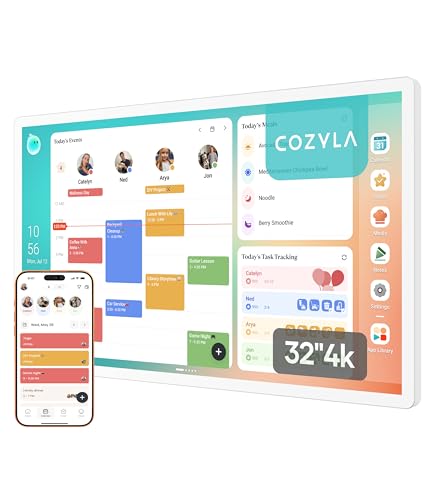
Cozyla Calendar Plus 2, 32 Inch 4K Smart Digital Calendar
A 32 inch Cozyla Calendar Plus 2 with a 4K touchscreen, Google Play Store, a voice agent and no-subscription sync for Google, Apple, Outlook and Yahoo.
Product information
Product Review Score
4.23 out of 5 stars
(169 reviews)Product links
Which of these calendars charge no monthly fee at all?
Nine of the ten state no recurring fee: the Cozyla, Apolosign, AOC, Topelotek, Yemsd, Airzeen, Aimuonos and SkyPeace listings all say sync works with no subscription. The Dragon Touch is the exception, keeping its core free while charging for Magic Import. Read the fee column word for word before you buy, since that wording is the only promise a maker makes.
Do these subscription-free calendars still sync with Google Calendar?
Yes. Every screen here lists Google sync, and most add Apple or iCloud and Outlook; the SkyPeace and Airzeen listings also name Cozi and Yahoo. Sync runs two-way on the Topelotek and SkyPeace, so an edit on a phone updates the wall screen. None of that depends on a paid plan, per the listings.
Will you lose any features if you never pay Dragon Touch?
Only the Magic Import tool. The Dragon Touch listing calls the chore chart, dinner planner, grocery list and photo frame free through its app, and places Magic Import behind a paid option. The nine other screens here name their full feature set as included. If paying for one tool is a deal-breaker, the fully no-fee screens cover the same daily jobs.
Does a no-subscription calendar still need Wi-Fi or an account?
Yes, in practice. Each listing sets up over Wi-Fi and pairs with an app to sync phones, even where there is no fee; the Aimuonos also notes it needs constant Type-C power with no battery. A free account is different from a paid plan, so a no-fee screen can still ask you to register. A paper printable monthly calendar or printable yearly calendar needs neither Wi-Fi nor a sign-in. Browse every model in our digital wall calendars category or the wider clocks and digital calendars aisle.
For paper planning beside a no-fee screen, see our family planner picks and the January calendar page.
How we made these notes: every fee detail is quoted from the maker listing on our product pages, collected by the Fresh Calendars team with AI help and checked before going live. Nobody on the team handled the hardware.


